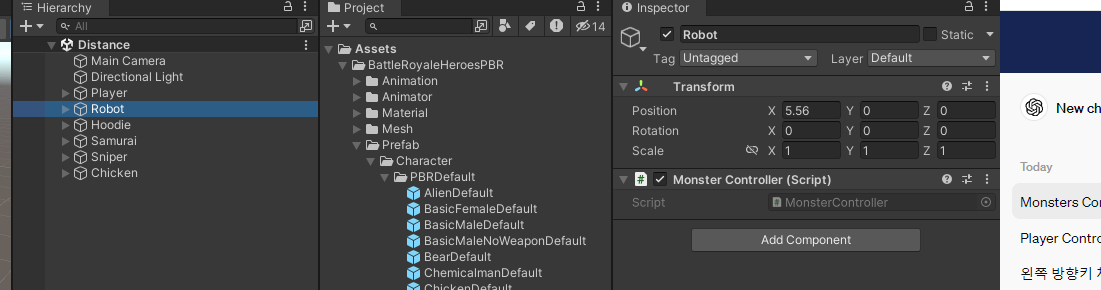
표적이 되는 다른 객체들은 assign할 수 만 있도록 MonsterController 스크립트만 할당 한 후

PlayerController에서 MonsterController 인스턴스로 배열을 선언 한후 

각각의 오브젝트를 assign


https://learn.microsoft.com/ko-kr/dotnet/api/system.collections.generic.list-1?view=net-8.0


List<T> 클래스 (System.Collections.Generic)

인덱스로 액세스할 수 있는 강력한 형식의 개체 목록을 나타냅니다. 목록의 검색, 정렬 및 조작에 사용할 수 있는 메서드를 제공합니다.

learn.microsoft.com


https://docs.unity3d.com/ScriptReference/Vector3.Distance.html


Unity - Scripting API: Vector3.Distance

Success! Thank you for helping us improve the quality of Unity Documentation. Although we cannot accept all submissions, we do read each suggested change from our users and will make updates where applicable. Close

docs.unity3d.com


코딩을 리뷰해보니 어려운 코드는 없었다.

가장 어려운 부분은 구조를 짜는 것이라 생각하는데

그 중에 인스턴스를 생성하거나 리스트를 생성했을때

값이 어떻게 이동되는지 이름만 옮겨지는지 이름과 값이 함께 쌍으로 넘어가는지 이 부분이 어려웠다.

Debug로 콘솔에 많이 찍어보고 값이 어떻게 출력이 되는지 확인하는데 시간을 가장 많이 썼다.


using System.Collections;
using System.Collections.Generic;
using UnityEngine;

public class PlayerController : MonoBehaviour
{
    public MonsterController[] monsters;
    void Start()
    {
        List<MonsterController> list = new List<MonsterController>();
        for (int i = 0; i < monsters.Length; i++)
        {
            //몬스터컨트롤러의 인스턴스 생성
            MonsterController controller = monsters[i];
            //Debug.Log(controller);
            //플레이어와의 거리 구하기
            float distance = Vector3.Distance(this.transform.position, controller.transform.position);
            //Debug.LogFormat("이름 : {0}, 거리 : {1}",controller.gameObject.name, distance);
            //Debug.Log(controller.gameObject.name);

            if (distance <= 10)
            {
                list.Add(controller); //객체 형태로 담긴다 
            }
        }
        
        for(int i = 0; i < list.Count; i++)
        {
            MonsterController controller = list[i];
            float distance = Vector3.Distance(this.transform.position, controller.transform.position);
            //Debug.LogFormat("이름 : {0} , 거리 : {1}", controller.gameObject.name, distance);
        }


        //거리가 제일 가까운 객체 찾기
        float minDistance = Mathf.Infinity; // 초기값을 무한대로 지정
        MonsterController minObject = null; // 초기값을 담을 인스턴스 생성

        for(int i = 0; i < list.Count;i++)
        {
            MonsterController controller = list[i];
            float distance = Vector3.Distance(this.transform.position, controller.transform.position);
            if (distance < minDistance)
            {
                minDistance = distance;
                minObject = controller;
            }
        }
        Debug.LogFormat("거리가 가장 가까운 객체 : {0}, 거리 : {1}", minObject.name, minDistance);
    }
}​


using System.Collections;
using System.Collections.Generic;
using UnityEngine;

public class CSightVisualizer : MonoBehaviour
{
    public float radius = 3;
    private void OnDrawGizmos()
    {
        GizmosExtensions.DrawWireArc(this.transform.position, this.transform.forward, 360, radius);
    }
}


using System.Collections;
using System.Collections.Generic;
using UnityEngine;

public class MonsterController : MonoBehaviour
{
    // Start is called before the first frame update
    void Start()
    {
        
    }

    // Update is called once per frame
    void Update()
    {
        
    }
}

'산대특 > 게임 클라이언트 프로그래밍' 카테고리의 다른 글

Quaternion  (1) 2024.03.04
Dodge game  (0) 2024.03.04
코루틴 연습  (0) 2024.03.03
StarCraft - Tank  (0) 2024.02.29
StarCraft - DropShip Logic  (0) 2024.02.28

기존에 있는 에셋을 다운받아

가이드라인으로 잡고 명암을 줄이고

그 에셋을 찾아 UI를 본뜨는 작업을 하였는데

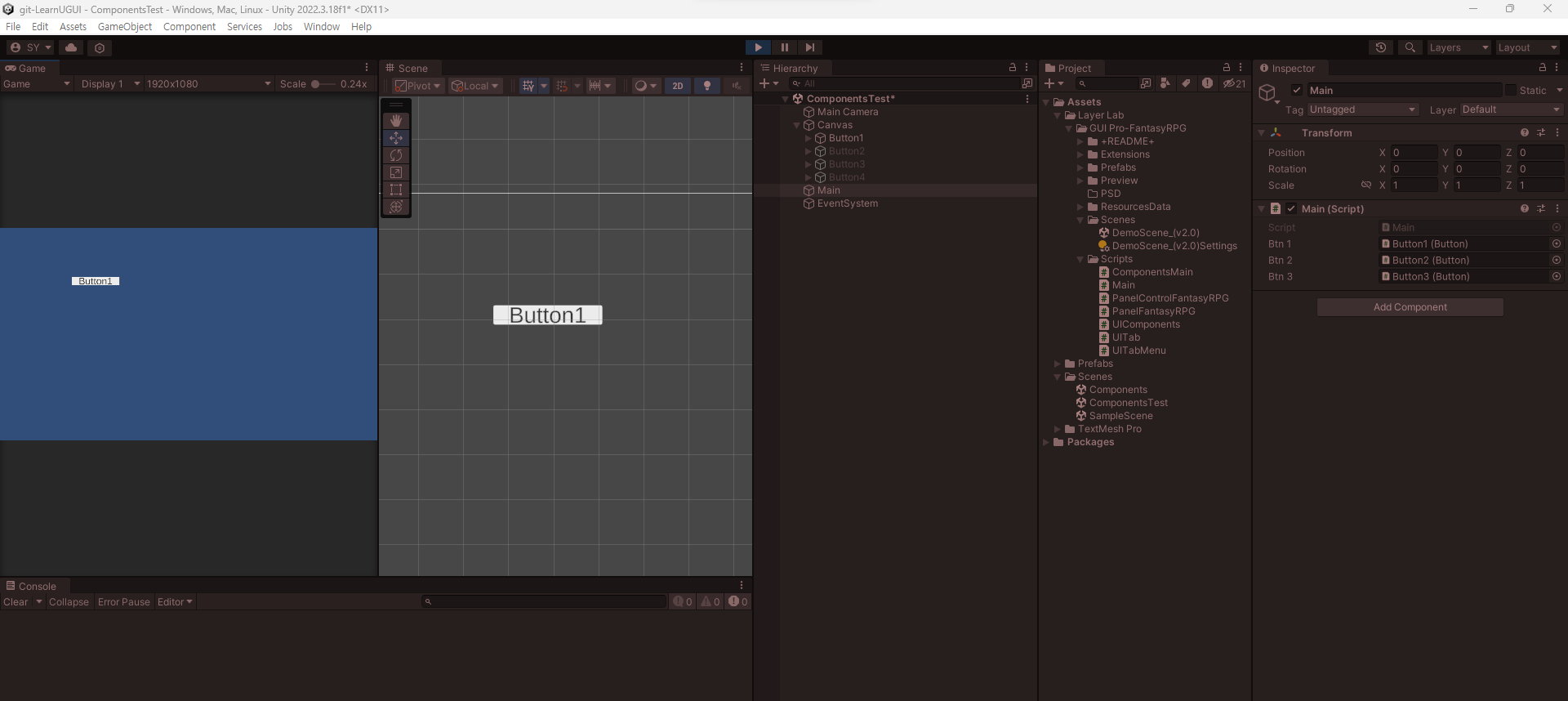
그것을 하기 전에 제일 기초이자 중요한 GameObject.onClick.AddListener()를 다루려 한다.


Button1을 클릭하면 콘솔에 찍힌다.


using System.Collections;
using System.Collections.Generic;
using UnityEngine;
using UnityEngine.UI;

public class Main : MonoBehaviour
{
    [SerializeField] private Button btn;

    void Start()
    {
        btn.onClick.AddListener(() =>
        {
            Debug.Log("button clicked!");
        });
    }
};


Button1을 클릭하면 2, 3번이 사라진다.


using System.Collections;
using System.Collections.Generic;
using UnityEngine;
using UnityEngine.UI;

public class Main : MonoBehaviour
{
    [SerializeField] private Button btn1;

    [SerializeField] private Button btn2;
    [SerializeField] private Button btn3;

    void Start()
    {
        btn1.onClick.AddListener(() => {
            this.btn2.gameObject.SetActive(false);
            this.btn3.gameObject.SetActive(false);
        });
    }
}


Button1을 클릭하면 2, 3이 사라지는데

Button2, Butto3을 배열(btns)로 만들어서 할당하였다.


using System.Collections;
using System.Collections.Generic;
using UnityEngine;
using UnityEngine.UI;

public class Main : MonoBehaviour
{
    [SerializeField] private Button btn1;

    [SerializeField] private Button[] btns;

    void Start()
    {
        btn1.onClick.AddListener(() => {

            for (int i = 0; i < this.btns.Length; i++)
            {
                Button btn = btns[i];
                btn.gameObject.SetActive(false);
            }
        });
    }
}


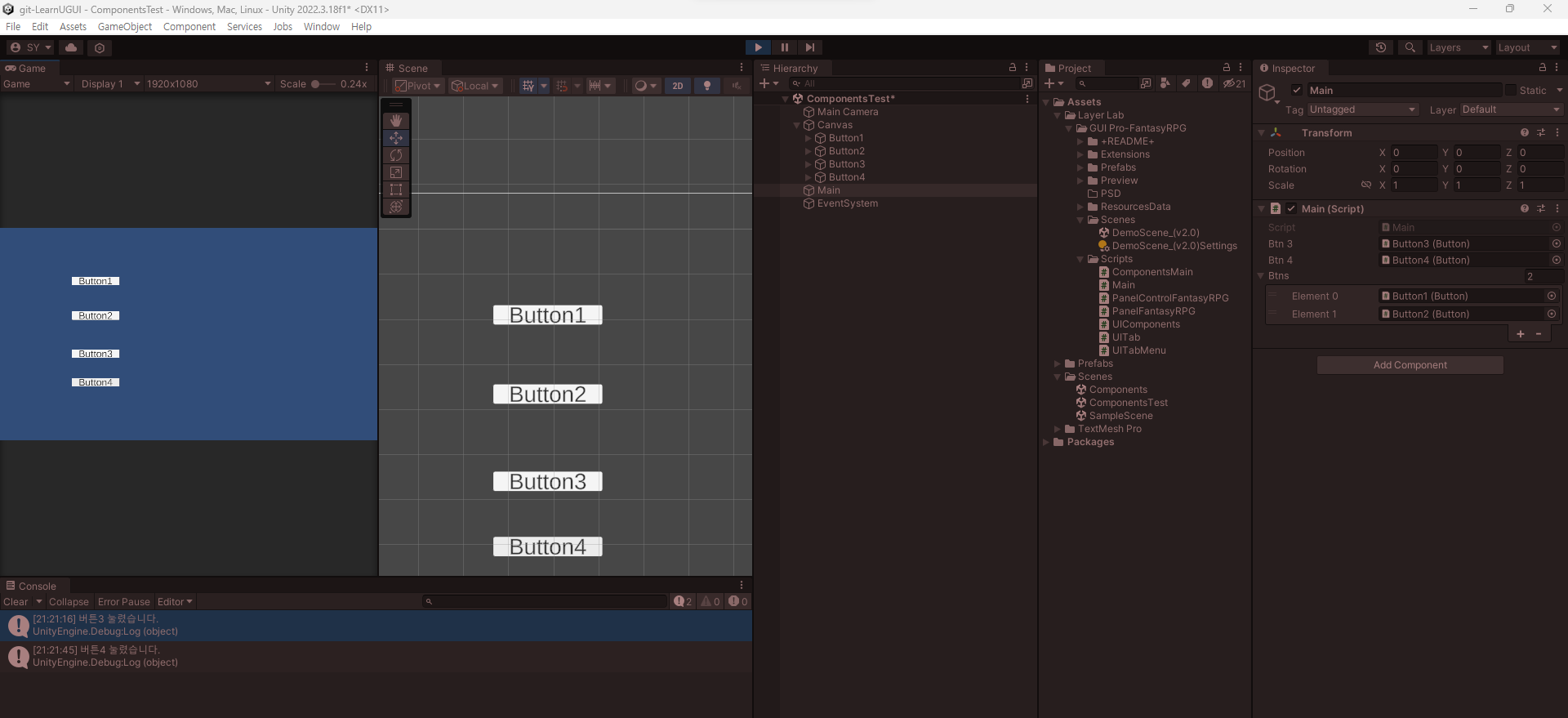
Button1, Button2를 btns(배열)에 할당하였고

Button3을 누를시 배열이 사라지고 Button4를 누를시 배열이 다시 생기게 작성

using System.Collections;
using System.Collections.Generic;
using UnityEngine;
using UnityEngine.UI;

public class Main : MonoBehaviour
{
    [SerializeField] private Button btn3;
    [SerializeField] private Button btn4;
    [SerializeField] private Button[] btns; //btn1, btn2

    void Start()
    {
        btn3.onClick.AddListener(() =>
        {
            Debug.Log("버튼3 눌렸습니다.");
            for (int i = 0; i < this.btns.Length; i++)
            {
                Button btn = btns[i];
                btn.gameObject.SetActive(false);
            }
        });

        btn4.onClick.AddListener(() =>
        {
            Debug.Log("버튼4 눌렸습니다.");
            for (int i = 0; i < this.btns.Length; i++)
            {
                Button btn = btns[i];
                btn.gameObject.SetActive(true);
            }
        });
    }
}

'산대특 > 게임 알고리즘' 카테고리의 다른 글

AppleCatch  (0) 2024.02.06
동기와 비동기  (1) 2024.02.05
직렬화와 역직렬화  (0) 2024.02.05
디자인 패턴과 싱글톤 패턴  (0) 2024.02.05
Process 와 Thread 그리고 Thread 와 Coroutine  (1) 2024.02.04

+ Recent posts