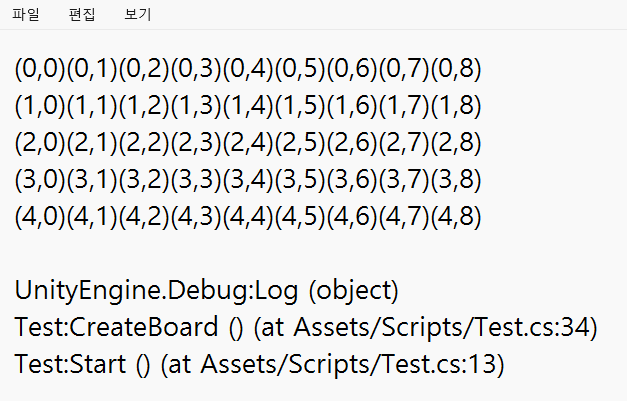
StringBuilder를 사용하여


using System.Collections;
using System.Collections.Generic;
using System.Text;
using Unity.VisualScripting;
using UnityEngine;

public class Test : MonoBehaviour
{
    private Block[,] board; //1차원 배열이 Block들을 관리
    public GameObject blockPrefab;
    void Start()
    {
        CreateBoard();
        //PrintBoard();
    }

    private void CreateBoard()
    {
        //크기가 9인 BlockType의 1차원 배열 만들기
        board = new Block[5, 9]; // 2차원 배열로 변경
        Debug.LogFormat("현재 보드의 칸의 총 개수 : {0}", board.Length); // 전체 길이
        Debug.LogFormat("행의 개수 : {0} ", board.GetLength(0));
        Debug.LogFormat("열의 개수 : {0} ", board.GetLength(1));

        StringBuilder sb = new StringBuilder();
        for(int i = 0; i < board.GetLength(0); i++)
        {
            for(int j = 0;  j < board.GetLength(1); j++)
            {
                sb.Append($"({i},{j})"); // StringBuilder에 문자열 추가
            }
            sb.AppendLine(); // 새로운 행 추가
        }
        Debug.Log(sb); // StringBuilder에 저장된 문자열을 출력
        //배열의 요소에 넣기(0~8까지의 랜덤한 값을 BlockType으로 바꿔서)
        //for (int i = 0; i < board.Length; i++)
        //{
        //    Block.BlockType blockType = (Block.BlockType)Random.Range(0, 5);

        //    //블록 프리팹 인스턴스를 생성
        //    GameObject blockGo = Instantiate(blockPrefab);
        //    //생성된 프리팹을 블록클래스의 블록에 할당
        //    Block block = blockGo.GetComponent<Block>();
        //    block.Init(blockType);
        //    block.SetPosition(i);
        //}
    }

    //private void PrintBoard()
    //{
    //    
    //    
    //    
    //    
    //    
    //    
    //}
}


using System.Collections;
using System.Collections.Generic;
using UnityEngine;
using UnityEngine.U2D;

public class AtlasManager : MonoBehaviour
{
    public static AtlasManager instance;
    public SpriteAtlas blockAtlas;
    //싱글톤
    private void Awake()
    {
        //AtlasManager 클래스의 인스턴스를 instance에 할당
        instance = this;
    }
}


using System.Collections;
using System.Collections.Generic;
using UnityEngine;

public class Block : MonoBehaviour
{
    public enum BlockType
    {
        Blue, Gray, Green, Pink, Yellow
    }

    public BlockType blockType;
    public SpriteRenderer spriteRenderer;
    public void Init(BlockType blockType)
    {
        this.blockType = blockType;
        //이미지 변경 
        ChangeSprite(blockType);
    }

    public void ChangeSprite(BlockType blockType)
    {
        //블록의 이름을 넣어서 아틀라스에서 같은 이름인 sprite를 찾고 할당
        Sprite sp =
            AtlasManager.instance.blockAtlas.GetSprite(blockType.ToString());
        spriteRenderer.sprite = sp;
    }

    public void SetPosition(int x)
    {
        Vector2 pos = transform.position;
        pos.x = x;
        transform.position = pos;
    }
}
using System.Collections;
using System.Collections.Generic;
using System.Text;
using Unity.VisualScripting;
using UnityEngine;

public class Test : MonoBehaviour
{
    private Block[,] board; //1차원 배열이 Block들을 관리
    public GameObject blockPrefab;
    void Start()
    {
        CreateBoard();
    }

    private void CreateBoard()
    {
        //크기가 9인 BlockType의 1차원 배열 만들기
        board = new Block[5, 9]; // 2차원 배열로 변경

        PrintBoard();


        //배열의 요소에 넣기(0~8까지의 랜덤한 값을 BlockType으로 바꿔서)
        //for (int i = 0; i < board.Length; i++)
        //{
        //    Block.BlockType blockType = (Block.BlockType)Random.Range(0, 5);

        //    //블록 프리팹 인스턴스를 생성
        //    GameObject blockGo = Instantiate(blockPrefab);
        //    //생성된 프리팹을 블록클래스의 블록에 할당
        //    Block block = blockGo.GetComponent<Block>();
        //    block.Init(blockType);
        //    block.SetPosition(i);
        //}
    }

    private void PrintBoard()
    {
        StringBuilder sb = new StringBuilder();
        for (int i = 0; i < board.GetLength(0); i++)
        {
            for (int j = 0; j < board.GetLength(1); j++)
            {
                sb.Append($"({i},{j})"); // StringBuilder에 문자열 추가
            }
            sb.AppendLine(); // 새로운 행 추가
        }
        Debug.Log(sb); // StringBuilder에 저장된 문자열을 출력
    }
}

변수란 ?


값이 저장된 메모리상의 위치

값에는 숫자 문자 등 다양한 종류가 있다.


키워드는 미리 정의되어 있는 예약된 식별자


이런것들이 데이터 타입

예시 3개


int : 정수(음수, 0, 양수)

float : 부동 소수점은 소수점이 있는 숫자

  string : 문자열은 문자들의 집합


값을 저장하기 위해 변수를 만들어야 한다


변수를 만든다 = 변수 정의 또는 변수 선언

정의 하는 법 = > 데이터타입 변수명;

int a ;
string b;


변수에 값을 저장 또는 넣는다 = 변수에 값 할당

변수에 값 할당 => 변수명 = 값;

int a = 10;
sting hello = "안녕하세요";


여기 '='는 같다가 아니라 오른쪽 값을 왼쪽 변수에 할당하는 '연산자'


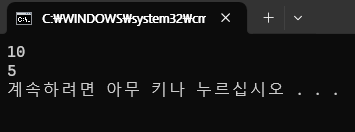
Console.WriteLine은 괄호안에 값을 콘솔창에 출력해주는 기능


using System;
using System.Collections.Generic;
using System.Linq;
using System.Text;
using System.Threading.Tasks;

namespace Step2
{
    internal class Program
    {
        static void Main(string[] args)
        {
            //주석 : 프로그램이 실행될 때 주석부분은 실행하지 않음

            //변수 선언 또는 변수 정의
            //정수형 체력 변수를 정의
            int hp;
            //int hp; 같은 이름의 변수를 다시 정의 할 수 없다. 값이 저장된 메모리상의 위치 -> 변수

            //변수에 값 할당
            //= 연산자를 사용 => =는 같다X 오른쪽 값을 왼쪽 변수에 넣는 연산자
            hp = 10;

            //다음과 같이 변수를 정의하고
            //할당하는 것을 한번에 할 수 있다
            int damage = 5;
            //변수에 할당된 값을 출력
            Console.WriteLine(hp);
            Console.WriteLine(damage);

            //소수점형식 변수 방어수치를 선언
            float armor;

            //변수에 값을 할당

            armor = 3.5f;

            Console.WriteLine(armor);

            //문자열 형식 변수 이름을 정의
            string name;
            //name변수에 값을 할당
            name = "홍길동";
            //변수의 값을 출력
            Console.WriteLine(name);
        }
    }
}


실행 단축키 => Ctrl + F5


소수점 형식은 접미사f를 값뒤에 붙여줘야 한다.

float a = 10.2f;

'Study > C#' 카테고리의 다른 글

[C#] 오류와 디버깅  (0) 2024.05.24
[C#] 컴파일과 빌드  (0) 2024.05.24
[C#] 주석  (0) 2024.05.24
[C#] 데이터 타입 bool, char, object  (0) 2024.05.24
[C#] Start  (0) 2024.05.23

데이터 형식(Data Types):

데이터의 '유형'과 '크기'를 지정


1. 기본 데이터 형식 (값 형식)

- 정수형식 (int,byte ..etc)

- 부동 소수형식 (float, double, demical)

2. 복합 데이터 형식

- 클래스

- 구조체(값 형식)

- 인터페이스

스택(Stack):

데이터를 쌓아 올리는 구조의 메모리

쌓인 순서의 역순으로 필요 없는 데이터를 자동으로 제거(자동메모리) => LIFO(Last In First Out)


힙(Heap):

자유롭게 데이터를 저장할 수 있는 메모리

별명 : 자유 저장소


값 형식(Value Type):

메모리에 값을 담는 형식

스택에 할당

기본 데이터 형식과 구조체가 여기에 해당됨


참조형식(Reference Type):

메모리에 다른 변수의 "주소를 담는" 데이터 형식

힙에 할당


기본 데이터 형식(Primitive Types)

수 형식(정수 형식, 부동 소수점 형식)

논리 형식

문자열 형식

object 형식


복합데이터 형식 : 기본 데이터 형식을 바탕으로 만들어짐


박싱 : 값 형식을 object형식에 담아 힙에 올리기
언박싱 : 힙에 올라가 있는 데이터를 object에서 꺼내 값 형식으로 옮기기


변수 : 변경이 가능한 수
상수 : 항상 최초의 상태를 유지하는 수 -> 변경하려는 시도시 컴파일 에러


열거형식 : 하나의 이름 아래 묶인 상수들의 집합

=>  enum키워드 사용
상수 선언시 ex) enum dia{yes} -> dia.yes;


var키워드 - 컴파일러가 자동으로 형식을 추론
ex) var a = 3; // a는 int 형식
주의 : "지역변수 안"에서만 사용가능(메소드 안에서만 ) + 클래스, 구조체 사용불가


using System;
using System.Collections.Generic;
using System.Data.SqlTypes;
using System.Linq;
using System.Text;
using System.Threading.Tasks;

namespace _20240222
{
    internal class Program
    {
        static void Main(string[] args)
        {
            //변수(Variables)에 대한 예제 문제:
            //1-1. 특정 프로그램에서 사용자의 이름을 입력받아 변수에 저장하고, 그 이름을 환영하는 메시지를 출력하는 프로그램을 작성하세요.
            //string a = "예준";
            //Console.WriteLine($"어서오세요 {a}");
            //Console.WriteLine("어서오세요 {0}", a);

            //2-2. 특정 도시의 현재 온도를 나타내는 변수를 만들고, 이 변수의 값을 5도 증가시킨 후 새로운 온도를 출력하는 프로그램을 작성하세요.
            //int temp = 24;
            //int now = temp + 5;
            //Console.WriteLine($"현재 온도는 {now}도 입니다");

            //3-3. 사용자로부터 두 개의 숫자를 입력받아 변수에 저장하고, 이 두 숫자를 더한 결과를 출력하는 프로그램을 작성하세요.
            //int a = 10;
            //int b = 20;
            //Console.WriteLine(a + b);

            //상수(Constants)에 대한 예제 문제:
            //2-1. 원주율을 상수로 선언하여 반지름이 5인 원의 넓이를 계산하여 출력하는 프로그램을 작성하세요.
            //float pi = 3.14f;
            //int r = 5;  // => float 과 int 의 곱이 된다.
            //float size = pi * pi * r;
            //Console.WriteLine(size);

            //2-2. 세금 비율을 0.1로 상수로 선언하고, 사용자로부터 어떤 상품의 가격을 입력받아 세금을 계산하여 총 가격을 출력하는 프로그램을 작성하세요.
            //float rate = 0.1f;
            //float price = 50.6f;
            //float total = rate * price;
            //Console.WriteLine(total); //=> 5.06

            //2-3. 1년에는 몇 개의 달이 있는지를 상수로 선언하고, 이 값을 사용하여 1년이 몇 개의 주가 있는지를 출력하는 프로그램을 작성하세요.
            //int CountOfMonth = 12;
            //int day = 365;
            //float CountOfWeek = day / CountOfMonth;
            //Console.WriteLine(CountOfWeek);
            // => 인트형끼리 나누면 소수점 자리가 Truncate을 하지 않아도 된다.


            //float CountOfMonth = 12f;
            //float day = 365f;
            ////float CountOfWeek = Math.Truncate(day / CountOfMonth); ==> 오류
            //float CountOfWeek = day / CountOfMonth;
            //Console.WriteLine(Math.Truncate(CountOfWeek)); // 30


        }
    }
}

'낙서장 > C#' 카테고리의 다른 글

[C#] 메서드 오버로딩  (0) 2024.06.02
virtual ,override, base  (2) 2024.03.08
상속과 다형성  (1) 2024.03.08
흐름 제어  (1) 2024.02.26
데이터를 가공하는 연산자  (0) 2024.02.25

+ Recent posts